QUARRY BLOCK DEMAND MANAGER
Quarry production board
Plan the cut. See the priority. Track production. Inventory stays in JDE.
LIVE PRODUCTION PRIORITIES
Ready for the next cut
Produce next
Open demand ordered by lateness, priority, and required date.
Net quarry production
Demand still requiring production after qualifying available/reserved inventory is considered.
Inventory can satisfy
Existing blocks that appear to meet open demand.
Active loaves
Blue / green = demand · Yellow = stock · Gray = loss
Changed today
Production, fulfillment, rejection, and edits.
Block Demand
Create demand by block size or by cubic foot. A demand can require both block count and total cube.
| Demand | Material | Requirement | Fulfilled | Due | Status | Planning | Actions |
|---|
Block Inventory
Finished physical blocks. Weight and cube are calculated from dimensions and stone density.
| Block # | Material | Loaf | Dimensions | Cube | Weight | Status | Demand | Notes | Actions |
|---|
Loaves
Loaf production, physical dimensions, blocks produced, and yield.
| Loaf # | Material | Dimensions | Gross Cube | Stage | Blocks | Planned Cube | Planned Recovery | Remnant / Loss | Actions |
|---|
Block Demand
Only open demand compatible with the selected loaf is offered for layout.
Loaf Layout
Select an existing loaf to begin.
DRILL STATIONS:
Measure every V station from the LEFT loaf edge.
Measure every H station from the TOP loaf edge.
Values are the center of the drill / wedge line.
Select a loaf and place demanded blocks
Blue demand
Green demand
Target stock block▧ Gray = remnant / split loss
Drill / wedge centers — dots ≈ 1 ft apart
Blocks are laid out on the tipped loaf face.
The smallest loaf dimension is treated as depth.
Blocks may rotate 90°.
The configured split allowance is reserved between adjacent blocks.
Auto Layout places compatible demand from every open job first.
Requested blocks are never enlarged simply to consume the loaf.
Pull a demanded block’s white edge handles to align drill lines.
Auto Layout may enlarge a block within its saved oversize allowances to align drill lines. Manual size changes require requester approval. Changes are saved on the planned block.
Use Fill Rest: Minnesota or Fill Rest: Raymond afterward.
Gray remnants are loss, not blocks.
Drill / wedge lines are then generated to free both the requested blocks and useful stock blocks.
History
Local audit trail. Completed and archived demand remain searchable.
| Date | Type | Record | Action | Details |
|---|
Material & shipping settings
These defaults drive block weight, cube planning, and advisory warnings.
A = Length. B = Width, which becomes standing height on the saw. C = Wall thickness / loaf depth, inherited from the selected loaf rather than entered here. Raymond cube is not limited.
These recipients are emailed automatically whenever a new Quarry Block Demand is entered.
Minnesota blocks may vary within these ranges and rotate 90°. Every block must stay below the configured cube limit at the actual loaf thickness. Minimum dimensions are never reduced to meet that limit.
Stock retains the actual wall thickness. Targets are never enlarged to absorb leftovers. Gray material is remnant or split loss. Re-run Auto Layout after changing these settings.
Local data
This prototype saves to this browser only. Export gives us an easy backup and migration path.
Quarry records are stored in the separate Quarry database. Signed-in devices refresh when idle. Export a backup before importing or resetting shared records.
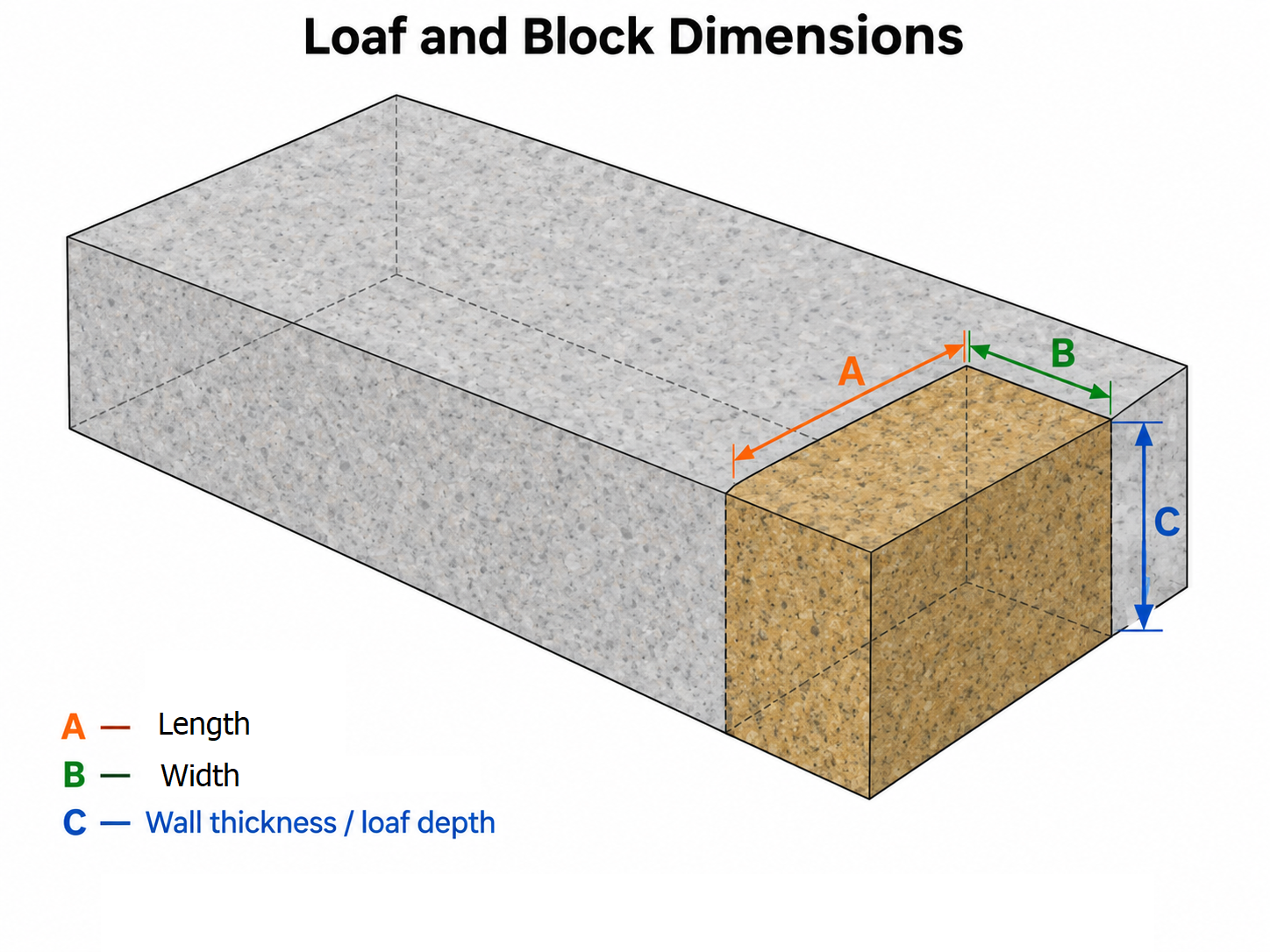
B becomes standing height on the saw. C is inherited from the loaf.
Legacy demand import
The old Quarry Demand Report is not driving the data model.
For this MVP, use manual demand entry or JSON import. A Minnesota report/CSV importer can be added once we know the export format reliably.
Rules in this build
• Blue does not automatically satisfy Green, and Green does not satisfy Blue.
• By Block Size demand requires minimum length and width. Loaf depth is inherited from the selected loaf.
• If quantity and cube are both entered, both must be satisfied.
• A block counts toward demand when its physical block number is allocated.
• Rejected blocks automatically stop satisfying demand.
• Block numbers are never generated by this application.
• By Block Size demand requires minimum length and width. Loaf depth is inherited from the selected loaf.
• If quantity and cube are both entered, both must be satisfied.
• A block counts toward demand when its physical block number is allocated.
• Rejected blocks automatically stop satisfying demand.
• Block numbers are never generated by this application.